
An MCP gateway for one person's machine, not a company's cluster.
Fix it once, everywhere.
An MCP gateway puts one endpoint in front of many MCP servers and decides which client may call what. Every gateway that ranks for the phrase is built for a company's cluster: Kubernetes, SSO, role hierarchies. Vodou is the same idea sized for one person's computer. Connect Gmail, Slack, GitHub or any other MCP server once in Vodou; then Claude Desktop, Claude Code, Cursor, VS Code, Windsurf and Zed attach to a single host over stdio or loopback HTTP at 127.0.0.1:8787, each with its own token, its own memory vault and its own rate limit — and an audit log that records what each client did without ever storing what it asked.
- Vodou is an MCP gateway that runs on your own computer: every MCP server you add connects once, and every MCP client on the machine reaches them through one host.
- Vodou serves the same tool catalog over two transports — stdio and loopback HTTP on 127.0.0.1:8787 — so a tool is never present on one transport and missing from the other.
- Vodou gives each attached client its own bearer token, memory vault, tool profile and per-minute rate limit; vodou-core mcp revoke <client> cuts one client off without touching the rest.
- Vodou's egress audit log keeps a salted digest and a byte count per call, never the arguments, and deletes rows after 30 days.
What is an MCP gateway?
An MCP gateway is a service that sits between MCP clients — AI agents and editors — and the MCP servers they call, presenting many servers as one catalog and applying authentication, authorization, routing and audit logging in one place. A plain MCP proxy only forwards traffic; a gateway decides whether a call may happen and records that it did. Vodou implements one for a single machine.
The Model Context Protocol (MCP) is the open standard AI clients use to call tools. As soon as one person runs more than one client — Claude Desktop for chat, Cursor for code, Claude Code in the terminal — every client needs its own configuration for every server, its own credentials, and its own running copy of each server process. The products that rank for "MCP gateway" solve that for organisations: Microsoft's MCP Gateway is a reverse proxy for Kubernetes, Kong and Composio add OAuth, SSO and team policies, MCP Manager sells compliance-grade audit logs. Anthropic's own Karan Sampath made the case at the AI Engineer conference, in a talk titled "Gateways are All You Need", that shared gateway infrastructure for authentication, observability and security is what lets MCP scale beyond one-off connectors.
Vodou applies the same design to the smallest possible scope: one person, one computer, six or seven MCP clients. It is the host side of Vodou — the other direction, Vodou connecting to MCP servers as a client, is managed under Settings → Servers, and both directions share the same server catalog.
Why does an MCP gateway matter on one machine?
Without a gateway, each MCP client on your computer keeps its own mcp.json: the same Gmail or GitHub credentials pasted into four files, four copies of every server process running at once, and no record of which agent read what. Vodou replaces that with one host on 127.0.0.1: connect a server once, attach Claude Desktop, Cursor or Zed with one command, and see — and revoke — what each client can reach.
Config sprawl
Claude Desktop, Cursor, VS Code and Claude Code each want their own server list. Add a server and you edit four files; rotate a key and you edit four files again.
Process sprawl
Every stdio client spawns its own copy of every configured server. Four editors open means four complete connection pools.
No visibility, no off-switch
A client can read your memory or call a tool and nothing says so. Cutting one client off means editing config and restarting everything.
How does Vodou work as an MCP gateway?
Vodou connects your MCP servers once, then attaches each client with one command, serves all of them from one catalog over stdio or loopback HTTP, and scopes, rate-limits and audits every client separately.
- STEP 1
Connect servers once.
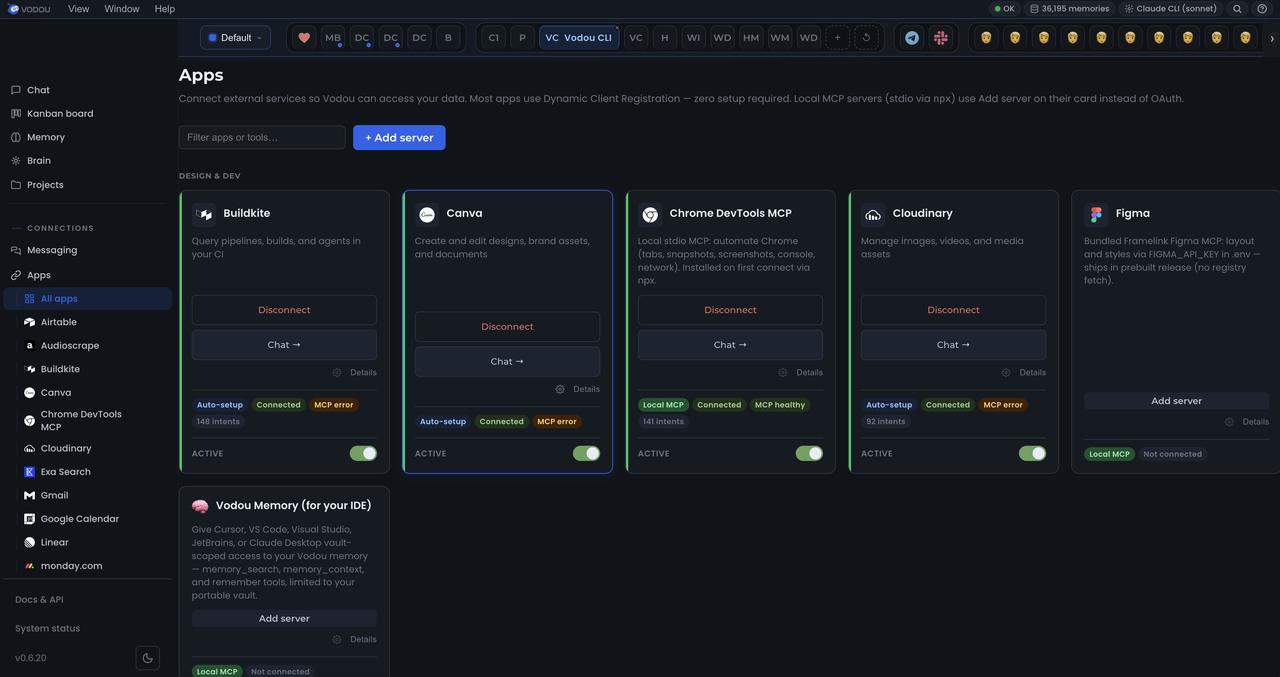
Gmail, Slack, Notion, GitHub and any other MCP server you add are connected and authorised inside Vodou (Settings → Servers). No per-client setup, no second config, no restart of the client.
- STEP 2
Attach a client with one command.
vodou-core mcp install cursor writes the entry for Cursor; claude-desktop, vscode, windsurf, zed and claude-code work the same way. The installer merges into the existing config, backs the file up to .vodou/backups/ first, updates in place on re-run, and refuses to write a config it cannot parse. For a client Vodou has never heard of, mcp install --print prints ready-to-paste config for both transports.
- STEP 3
Pick a transport — the catalog is identical.
stdio is the default: the client launches vodou-core mcp-server itself, one Vodou per client, nothing to start. Loopback HTTP (vodou-core mcp-server --http) runs one Vodou on 127.0.0.1:8787 for every client at once; each attach mints a bearer token for that client alone, and only the SHA-256 digest is stored. There is no setting that exposes the port to your network.
- STEP 4
Scope, limit, watch, revoke.
A profile (full, dev, memory, or custom:a,b) can only subtract tools — a withheld tool is refused when called, not merely hidden. --vault family pins the one memory vault the client may read; the tool schema has no vault argument, so a client cannot ask for another. --rate-limit 120 caps calls per minute. vodou-core mcp clients shows who is attached, under what scope, and when they were last seen; mcp revoke cursor returns 401 mid-session while every other client keeps working.
Where does Vodou's memory work?
Vodou's memory works everywhere you talk to an AI: in the browser on 22 AI chat sites through the Vodou Bridge Chrome extension, in Claude Code, Cursor and Codex through hooks, in Claude Desktop, VS Code, Windsurf, Zed and any MCP client through the MCP host, in Slack, Telegram, WhatsApp and every other messaging channel you connect, in the Vodou Console web chat, from the command line, and through an OpenAI-compatible API on your machine.
| SURFACE | HOW MEMORY GETS THERE | READS | WRITES | NOTES |
|---|---|---|---|---|
Browser — 22 AI chat sites ChatGPT, Claude, Gemini, AI Studio, Grok, Perplexity, DeepSeek, Copilot, Le Chat, Qwen, Kimi, Z.ai, T3 Chat, OpenRouter, Poe, Meta AI, Manus, You.com, Duck.ai, NotebookLM, HuggingChat, Character.AI | Vodou Bridge extension: Ctrl+B injects into the chat box; capture is automatic per site | ✓ | ✓ | Chrome Web Store · 35 host patterns · the panel prompts you to install Vodou if it isn't running · → Browser extension |
Browser — any text box on any page | Ctrl+Shift+B visible insert; “Fill this form from Vodou” (never submits) | ✓ | opt-in per site | Same extension · → Browser extension |
Claude Code | Four hooks: SessionStart, UserPromptSubmit, PostToolUse guard, SessionEnd extraction; plus a generated MEMORY.md in the workspace | ✓ | ✓ | → Claude Code memory |
Cursor | Same hook binary via .cursor/hooks.json, written by the installer | ✓ | ✓ | → Claude Code memory |
Codex in Cursor / VS Code, Agent Mode | Hooks + MCP | ✓ | ✓ | — |
Claude Desktop, VS Code, Windsurf, Zed, any MCP client | Vodou MCP host: vodou-core mcp install <client>; stdio or loopback HTTP 127.0.0.1:8787; per-client token + vault | ✓ (vault-scoped) | ✓ | |
Any agent that speaks MCP | Vodou-Recall tools: search_memory, memory_store, memory_correct, memory_reject, memory_pin, memory_get, get_current_work | ✓ | ✓ | Plus feed tools that trigger automations |
Messaging — Slack, Telegram, Discord, WhatsApp, iMessage, Signal, Microsoft Teams, Google Chat, voice, web and more | Built-in channels plus any channel you install; same assistant, same memory; approvals reach every channel | ✓ | ✓ | WhatsApp: only threads you start, only your own messages |
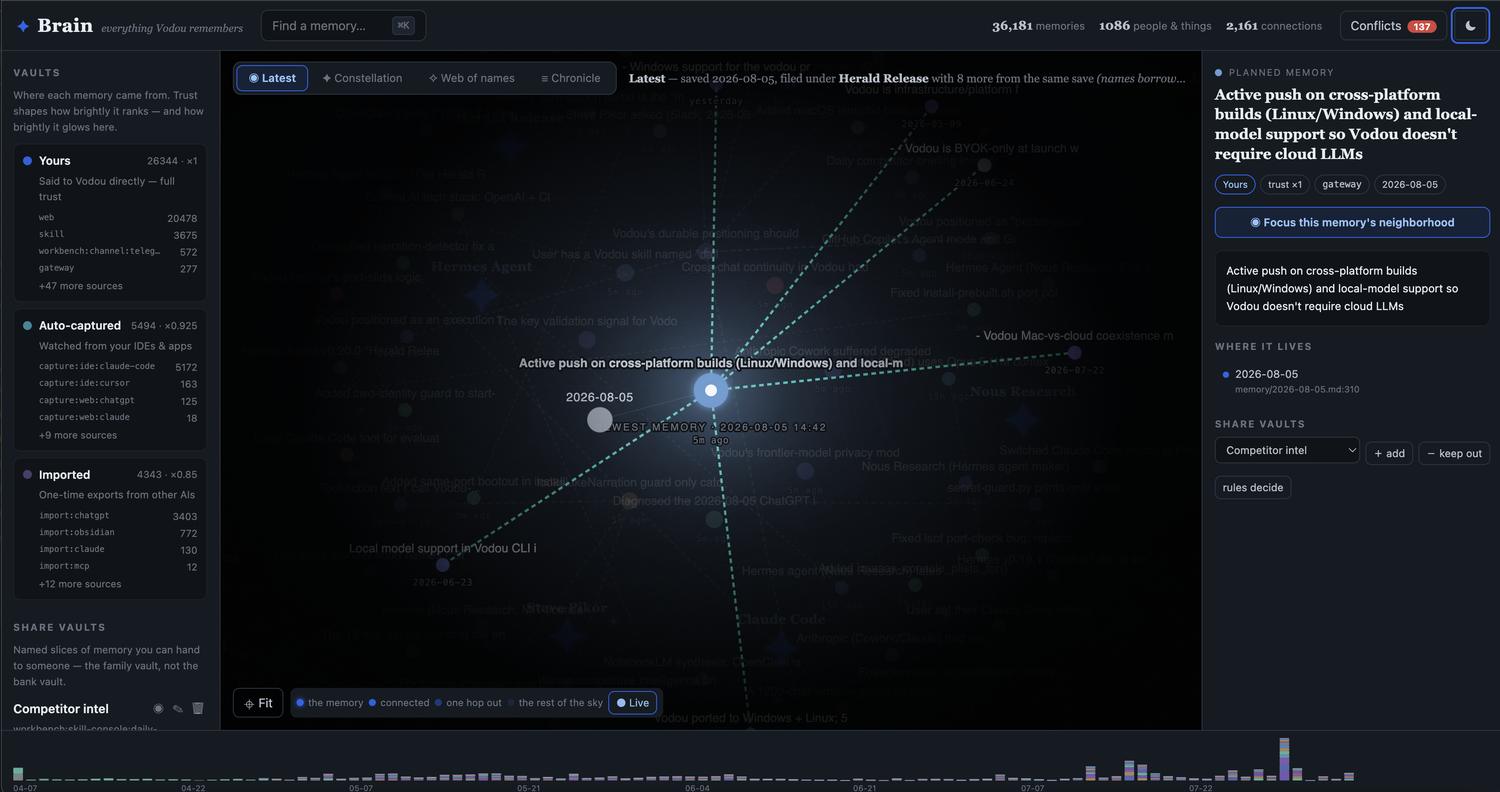
Vodou Console localhost:8765 | Web chat with memory injected every turn; Memory tab; Brain map; correct / reject / pin / undo; Projects; Board | ✓ | ✓ | The inspect-and-fix surface |
Terminal — ./do, vodou-core mem | mem search, mem why, mem pin, mem correct, mem import, mem vault | ✓ | ✓ | A full, documented CLI |
Vodou CLI (TUI) | vodou from any directory: the same chat loop in your terminal, memory included | ✓ | ✓ | vodou -p “…” one-shot |
OpenAI-compatible API /v1/chat/completions on 127.0.0.1:8765 | Point any OpenAI-format client or app at Vodou and it answers with memory, skills and tools | ✓ | ✓ | Streaming supported |
Core HTTP API 127.0.0.1:8766 | /api/v2/memory/recall and the rest of a typed local API; TypeScript SDK | ✓ | ✓ | Bearer token, local only |
Kanban board workers | Each spawned agent gets the top memory matches in its prompt | ✓ | ✓ | → Automation |
Scheduler, automations, Skill Consoles | Scheduled and event-triggered runs execute with the same memory | ✓ | ✓ | → Automation |
Imports (one-way in) | ChatGPT, Claude, Obsidian, OpenClaw, Hermes, Letta, Vodou pack | — | ✓ | Facts keep an import:<source> label |
Local models and any hosted provider Ollama, LM Studio, bundled llama.cpp | Whichever model answers, it reads the same memory | ✓ | — | The model changes. Your memory doesn't. |
What can you do with Vodou's MCP gateway?
One MCP host for every editor
Attach Claude Desktop, Claude Code, Cursor, VS Code, Windsurf and Zed to the same Vodou and they all see the same servers, the same skills and the same memory. Connect Gmail once; every client can send mail.
An MCP server manager you configure once
Servers are connected, authorised and health-checked inside Vodou. Adding a server to Vodou adds it to every attached client; nothing in the clients' config changes.
A memory vault per client
Hand Cursor the portable vault and Claude Desktop the family vault from one server on one port. Vaults are chosen at launch, never at call time, and a vault that no longer exists fails closed and is flagged as missing in mcp clients.
Tool profiles that subtract, never add
dev is full minus shell and file writes; memory keeps only the read-only memory tools, for a client you are still evaluating. Under any profile but full, results are stripped to the MCP-spec fields so a permitted tool cannot carry withheld context out in its envelope.
An MCP audit log that never stores what you asked
Every call is logged as a salted per-install digest plus a byte count, with outcome ok / denied / error / limited. Enough to see “Cursor called this tool 40 times” or “this client sent 400 KB”; not enough to reconstruct the query. Rows expire after 30 days.
A self-hosted MCP gateway with no relay
The host binds only to 127.0.0.1 and there is no cloud hop. The trade-off is explicit: hosted clients like claude.ai and ChatGPT cannot reach it, so for those Vodou uses the Vodou Bridge extension instead.
Vodou helps me pick up where I left off without constantly re-explaining the context. I'm able to stay in motion and move my work forward much faster.
Sources Model Context Protocol specification · “Gateways are All You Need”, Karan Sampath (Anthropic), AI Engineer · Vodou docs: mcp-host.md
How does Vodou compare to Microsoft MCP Gateway, Kong and Composio?
Microsoft's MCP Gateway, Kong and Composio are gateways for organisations: Kubernetes, OAuth and SSO, team policies, and Composio's 1,500+ hosted apps. Vodou is a gateway for one person's machine: any server, a token, vault and rate limit per client, and an audit log that never stores arguments. Vodou has no SSO, no roles, no hosted endpoint, and needs a free account to license the engine; if you run agents for a company, the enterprise products are the right tools.
| CAPABILITY | VODOU public alpha | MICROSOFT MCP GATEWAY | KONG AI GATEWAY | COMPOSIO MCP GATEWAY |
|---|---|---|---|---|
| Built for | one person's computer | Kubernetes clusters (local K8s or Azure) | production API/AI traffic | agent fleets across teams |
| Where it runs | your machine, 127.0.0.1 only | your cluster / Azure | Konnect cloud or self-hosted | Composio Cloud, your VPC or self-hosted |
| Servers / tools | Unlimited — any MCP server you add | your servers | your servers + REST→MCP | 1,500+ apps |
| Transports | stdio + loopback HTTP, one catalog | Streamable HTTP | HTTP/HTTPS only | HTTP |
| Auth per client | bearer token, SHA-256 digest stored | Entra ID + app roles; anonymous locally | key / OIDC / OAuth2 | OAuth, SAML/OIDC SSO, SCIM 2.0 |
| Per-client tool scope | profiles (subtract-only) | roles | per-tool ACLs | org / team / user / action policies |
| Memory vault per client | yes, fixed at launch | — | — | — |
| Rate limit | per client, per minute | not mentioned | yes (Rate Limiting plugins) | absorbs upstream 429s |
| Audit log | salted digest + bytes, never arguments, 30 days | not mentioned | session IDs, methods, payloads | every call, payloads never stored, 7 days – 1 year |
| SSO / roles / admin console | no | roles | yes (SSO on Enterprise) | yes (SSO/SCIM on Enterprise) |
| Hosted clients (claude.ai, ChatGPT) | not supported | not documented | remote HTTP endpoint | yes — Claude, ChatGPT, Gemini, Codex, Cursor |
| Code you can read | gateway, skills, servers: Apache-2.0; engine proprietary | MIT | Gateway Apache-2.0; MCP proxy Enterprise-only | SDKs MIT; gateway closed |
| Price | $10/mo BYOK · 60-day free trial | free (MIT) | 30-day free trial; Plus per gateway/month; MCP proxy in AI Gateway Enterprise (custom) | Free (100k tool calls/mo) · $29/mo Scale · Enterprise custom |
| Needs an account | yes (free; licenses the engine) | Azure for cloud mode | Konnect (or self-managed license) | yes |
Sources checked (2026-09-17); competitor columns are as of that date.
- Microsoft MCP Gateway — github.com/microsoft/mcp-gateway (README: MIT, Kubernetes/Azure, Entra ID + app roles, Streamable HTTP; no rate limit or audit log documented)
- Kong — developer.konghq.com/mcp · AI MCP Proxy plugin (Enterprise-only, Gateway 3.12+, HTTP/HTTPS, per-tool ACLs, rate limiting via plugins) · konghq.com/pricing · github.com/Kong/kong (Apache-2.0)
- Composio — composio.dev/mcp-gateway · composio.dev/pricing · github.com/ComposioHQ/composio (SDKs, MIT)
- MCP Manager — mcpmanager.ai · mcpmanager.ai/pricing · docs.mcpmanager.ai/features/overview
- Per-client mcp.json — no vendor page; describes each MCP client's own config file
Vodou column checked against the product on 2026-09-17.
Frequently asked questions about MCP gateways
What is a MCP gateway?
An MCP gateway is one endpoint that fronts many MCP servers and applies authentication, access control, routing and audit logging to every tool call an AI client makes. Enterprise gateways from Kong, Microsoft and Composio do this for a company's agents. Vodou does it for one person's computer: every MCP server you add, behind one host on 127.0.0.1, with a token, vault and rate limit per client.
What is the difference between an MCP proxy and an MCP gateway?
A proxy forwards MCP traffic to the right server; a gateway decides whether the call may happen, on whose authority, and writes down that it did. Vodou is a gateway in that sense: each client has its own token and tool profile, a withheld tool is refused when called, and every call lands in an audit log as a salted digest with its outcome — ok, denied, error or limited.
What does an MCP gateway do?
It centralises four jobs — routing, authentication, authorization and observability — so clients never talk to servers directly. In Vodou the routing is one catalog served over stdio or loopback HTTP, authentication is a bearer token per client, authorization is a profile plus a memory vault chosen at launch, and observability is vodou-core mcp clients plus a 30-day audit log.
MCP gateway vs MCP server — what is the difference?
An MCP server exposes one set of tools — Gmail, GitHub, a database. An MCP gateway sits in front of many servers and presents them as one catalog with policy on top. Vodou is both: it connects to any MCP server you add as a client, and hosts a gateway that lets Claude Desktop, Cursor, VS Code, Windsurf and Zed reach all of them through a single vodou entry.
How to create a MCP gateway?
For one machine, install Vodou and run vodou-core mcp install <client> for each editor you use. That command merges a vodou entry into the client's existing MCP config, backs the file up first, and restarts nothing but the client. Add --http to serve every client from one process on 127.0.0.1:8787, --profile to limit tools, --vault to limit memory, and --rate-limit to cap calls per minute.
What is MCP used for?
MCP — the Model Context Protocol — is the open standard AI assistants and coding agents use to call external tools and read external data: send an email, query a database, search your notes. Vodou uses it in both directions: it connects to unlimited MCP servers as a client, and acts as an MCP host so Claude Desktop, Cursor and any other MCP client can use those servers, plus Vodou's memory and every skill you install or write.
Is there a best MCP gateway that is open source and self-hosted?
It depends on the scale. For a company, Microsoft's MIT-licensed MCP Gateway (Kubernetes) and self-hosted options from Kong and Composio are the usual shortlist. For one developer's laptop, Vodou runs entirely on 127.0.0.1 with no relay; its gateway, skills, extension and MCP servers are Apache-2.0 on GitHub, while the Rust engine is proprietary and needs a free account.
What is an MCP host vs client vs server?
In MCP terms the host is the application that owns the session (Claude Desktop, Cursor), the client is the connection it opens, and the server is the tool provider. Vodou blurs the line usefully: to your editors it is a server called vodou; behind that one entry it acts as a host for every server you connect, a memory vault and a skill library, so one connection replaces dozens.
More from Vodou
- AI memoryMemory you own that compounds with every session.
- AI harnessPlain English in, executed answer out.
- Agent harnessSkills, MCP, workers and hooks — already wired.
- Browser extensionYour chats, captured locally and typed back anywhere.
- AI orchestrationRoute before inference. Run tools together.
- SkillsWorkflows that run the same way every time.
- AutomationAgents that run unattended, within budgets you set.
- Local AI agentRuntime, memory and tools on your machine.
- Claude Code memoryMemory in Claude Code, Cursor and Codex on every prompt.
One host. Every client. Fix it once, everywhere.
Install Vodou, connect your MCP servers once, and attach Claude Desktop, Cursor, VS Code, Windsurf and Zed with one command each. Free for 60 days, no credit card.
Updated