
Persistent AI memory you own — local, inspectable, and it acts.
The model changes. Your memory doesn't.
Persistent AI memory is the layer that lets an AI remember you across sessions instead of starting cold every chat. Vodou builds that layer on your own machine: every conversation you have with ChatGPT, Claude, Gemini, Cursor or 19 other AI sites is captured into a local SQLite memory, searched with full-text and vector retrieval, and typed back into whichever tool you open next — visibly, before you hit send. Unlike a memory feature locked inside one vendor, Vodou's memory shows why it remembered something, lets you correct or undo it, and routes what it knows into skills and tools so the memory does work, not just recall.
- Vodou stores persistent AI memory in a local SQLite database on your computer, with full-text (FTS5) and vector search plus a reranker running on-device; with a local model, nothing leaves your machine at all.
- Vodou's memory works on every surface you use: 22 AI chat sites through the Vodou Bridge Chrome extension, Claude Code and Cursor through hooks, Claude Desktop, VS Code, Windsurf and Zed through the MCP host, Slack, Telegram, WhatsApp and any other messaging channel, the Vodou Console, the terminal, and an OpenAI-compatible API.
- Vodou imports existing memory and conversations from ChatGPT, Claude, Obsidian, OpenClaw, Hermes and Letta, keeping the source of every fact.
- Vodou is a persistent AI memory that also executes: what it remembers routes into unlimited skills, unlimited MCP servers and any LLM provider.
What is persistent AI memory?
Persistent AI memory is an external, durable store an AI assistant reads from and writes to across separate sessions, so it remembers your preferences, projects and decisions after a chat ends. It is different from a context window, which is wiped when the conversation closes. Vodou implements it as a local SQLite database with hybrid search and an MCP host.
Most AI tools now ship some memory: ChatGPT keeps saved memories and "dreaming" updates, Claude keeps editable Topics shared between Claude.ai and Cowork (but not Claude Code), Gemini keeps past chats. Each one is a separate silo owned by that vendor, works only inside that product, and can't be read by the next tool you open. Under the hood every persistent memory system runs the same five-step loop: capture what was said, store it outside the model, retrieve what is relevant, inject it into the next prompt, and update it when a newer fact supersedes an older one. That last step is what separates memory from plain retrieval (RAG): a document search answers questions, a memory keeps track of what became true and when. Researchers usually split memory into episodic (what happened), semantic (facts), and procedural (how you like things done). Vodou stores all three in one place you control, then makes that one place reachable from every AI you use — the browser, the terminal, your IDE, and messaging apps.
Vodou runs on your machine and needs a free Vodou account so the engine can be licensed to you. Your memory is stored on your disk, and search, embeddings and reranking run on-device. Two things can leave your computer, both under your control: what you send to the AI you are talking to, and the conversation text Vodou's extraction step reads to pull out facts — which goes to the model you selected. Choose a local model (Ollama, LM Studio or the bundled llama.cpp) and neither leaves.
Why does AI memory matter?
Without persistent memory you re-explain yourself to every AI, every day: the project, the constraints, the decision you already made on Tuesday. Vendor memory fixes this only inside one app, so switching from ChatGPT to Claude to Cursor resets everything. Vodou keeps one memory across all of them, on your machine, so you start where you left off and decisions stay decided no matter which model answers.
Context resets constantly
Every new chat, every new tool, every model upgrade starts from zero. Memory that lives in one vendor's cloud doesn't follow you.
You can't see what the AI “knows”
Vendor memory is a black box; you find out what it retained when it gets something wrong.
Memory that only recalls is half the job
Remembering that you ship on Fridays is useless if nothing can act on it. Vodou's memory feeds skills, tools and schedules.
How does Vodou give every AI persistent memory?
Vodou captures what you say to any AI, distills it into facts stored locally, and hands the relevant facts back to whichever AI you open next — then lets you inspect, correct and act on them.
- STEP 1
Capture from the AI tools you already use.
The Vodou Bridge Chrome extension records your conversations on 22 AI chat sites and talks to Vodou on 127.0.0.1 for everything you read, type or save (its only other request is a public capture-policy file from policy.vodou.ai). Claude Code and Cursor are captured through four lightweight hooks; Claude Desktop, VS Code, Windsurf and Zed attach through Vodou's MCP host; Slack, Telegram and every other channel you connect write in too.
Deep dive: Browser extension · Claude Code memory · MCP gateway
- STEP 2
Distill and store locally.
An extraction pass turns raw turns into durable facts in a SQLite memory.db, indexed for full-text (FTS5) and vector search with a cross-encoder reranker on top. Each fact keeps its provenance and a trust weight (first-party 1.0, auto-captured 0.925, imported 0.85), and contradiction and deduplication passes keep the store clean as it grows.
- STEP 3
Bring it back where you're working.
Press Ctrl+B in any of the 22 sites and Vodou types the relevant memory into the chat box, visible and editable before you send — with auto-attach off, which is the default, nothing is sent on your behalf. In Claude Code the same memory is injected on session start and on every prompt; in Cursor it loads at session start and every prompt refreshes a context file of matching memories that the Cursor agent reads. In MCP clients it arrives through a vault scoped to that client. In Slack or Telegram it is simply there.
- STEP 4
Inspect, correct, act.
Every injected memory shows why it was chosen. Correct it, reject it, pin it, or undo it from the Vodou Console. And because the memory sits inside Vodou's harness, what it knows routes into unlimited skills, unlimited MCP servers and scheduled automations — the memory does things.
How do the parts of Vodou's memory system fit together?
Vodou's memory system is one local store fed by four capture paths and read by every surface you use. The Vodou Bridge extension, Claude Code and Cursor hooks, the MCP host and messaging channels all write conversations in; an extraction pass distills them into facts in memory.db; hybrid retrieval picks the right facts; and the same facts are injected back into the browser, your IDE, MCP clients and chat channels.
| PART | WHAT IT DOES | WHERE IT RUNS | DEEP-DIVE |
|---|---|---|---|
| Vodou Bridge (Chrome extension) | Captures your chats on 22 AI sites (35 hosts) and injects memory back with Ctrl+B — typed into the chat box, visible before you send. Talks to Vodou on 127.0.0.1. | Chrome, on your machine | Browser extension · Chrome Web Store |
| Claude Code / Cursor / Codex hooks | Four hooks: memory on session start and on every prompt (in Cursor, via a context file the agent reads each turn), a write guard, and extraction on session end. A binary under 500 KB over a Unix socket; never touches the database directly. | Your terminal / IDE | Claude Code memory |
| MCP host | Claude Desktop, VS Code, Windsurf, Zed and any MCP client attach with their own token and a vault that fixes what they can read. Stdio or loopback HTTP, one catalog. | Your machine, 127.0.0.1 | MCP gateway |
| Channels | Slack, Telegram, Discord, WhatsApp, iMessage, Signal, Microsoft Teams, Google Chat, voice and web talk to the same assistant with the same memory. | Vodou Console | — |
| Extraction | Turns raw turns into durable facts with a source, a date and a trust weight; contradiction and dedup passes keep the store clean. | Vodou daemon, on a schedule | — |
| The store (memory.db) | SQLite with FTS5 full-text, vector embeddings and a cross-encoder reranker; a precision floor injects nothing rather than noise. | Your disk, chmod 600 | — |
| Vaults | Named slices of memory by scope, tag, project, host or age, handed to one client at a time. | Store + MCP host | MCP gateway |
| Importers | ChatGPT, Claude, Obsidian, OpenClaw, Hermes, Letta, Vodou pack — every imported fact keeps an import:<source> label and is never auto-promoted. | CLI / Console | — |
| Console + Brain map | See what Vodou knows, why a memory was used, correct, reject, pin or undo it; the Brain view draws memory as a constellation or a timeline. | localhost:8765 | — |
| The harness | What memory knows routes into every skill and MCP server you add, schedules and the kanban board — memory that acts, not just recalls. | Vodou engine | AI harness · Automation |
Where does Vodou's memory work?
Vodou's memory works everywhere you talk to an AI: in the browser on 22 AI chat sites through the Vodou Bridge Chrome extension, in Claude Code, Cursor and Codex through hooks, in Claude Desktop, VS Code, Windsurf, Zed and any MCP client through the MCP host, in Slack, Telegram, WhatsApp and every other messaging channel you connect, in the Vodou Console web chat, from the command line, and through an OpenAI-compatible API on your machine.
| SURFACE | HOW MEMORY GETS THERE | READS | WRITES | NOTES |
|---|---|---|---|---|
Browser — 22 AI chat sites ChatGPT, Claude, Gemini, AI Studio, Grok, Perplexity, DeepSeek, Copilot, Le Chat, Qwen, Kimi, Z.ai, T3 Chat, OpenRouter, Poe, Meta AI, Manus, You.com, Duck.ai, NotebookLM, HuggingChat, Character.AI | Vodou Bridge extension: Ctrl+B injects into the chat box; capture is automatic per site | ✓ | ✓ | Chrome Web Store · 35 host patterns · the panel prompts you to install Vodou if it isn't running · → Browser extension |
Browser — any text box on any page | Ctrl+Shift+B visible insert; “Fill this form from Vodou” (never submits) | ✓ | opt-in per site | Same extension · → Browser extension |
Claude Code | Four hooks: SessionStart, UserPromptSubmit, PostToolUse guard, SessionEnd extraction; plus a generated MEMORY.md in the workspace | ✓ | ✓ | → Claude Code memory |
Cursor | Same hook binary via .cursor/hooks.json, written by the installer | ✓ | ✓ | → Claude Code memory |
Codex in Cursor / VS Code, Agent Mode | Hooks + MCP | ✓ | ✓ | — |
Claude Desktop, VS Code, Windsurf, Zed, any MCP client | Vodou MCP host: vodou-core mcp install <client>; stdio or loopback HTTP 127.0.0.1:8787; per-client token + vault | ✓ (vault-scoped) | ✓ | → MCP gateway |
Any agent that speaks MCP | Vodou-Recall tools: search_memory, memory_store, memory_correct, memory_reject, memory_pin, memory_get, get_current_work | ✓ | ✓ | Plus feed tools that trigger automations |
Messaging — Slack, Telegram, Discord, WhatsApp, iMessage, Signal, Microsoft Teams, Google Chat, voice, web and more | Built-in channels plus any channel you install; same assistant, same memory; approvals reach every channel | ✓ | ✓ | WhatsApp: only threads you start, only your own messages |
Vodou Console localhost:8765 | Web chat with memory injected every turn; Memory tab; Brain map; correct / reject / pin / undo; Projects; Board | ✓ | ✓ | The inspect-and-fix surface |
Terminal — ./do, vodou-core mem | mem search, mem why, mem pin, mem correct, mem import, mem vault | ✓ | ✓ | A full, documented CLI |
Vodou CLI (TUI) | vodou from any directory: the same chat loop in your terminal, memory included | ✓ | ✓ | vodou -p “…” one-shot |
OpenAI-compatible API /v1/chat/completions on 127.0.0.1:8765 | Point any OpenAI-format client or app at Vodou and it answers with memory, skills and tools | ✓ | ✓ | Streaming supported |
Core HTTP API 127.0.0.1:8766 | /api/v2/memory/recall and the rest of a typed local API; TypeScript SDK | ✓ | ✓ | Bearer token, local only |
Kanban board workers | Each spawned agent gets the top memory matches in its prompt | ✓ | ✓ | → Automation |
Scheduler, automations, Skill Consoles | Scheduled and event-triggered runs execute with the same memory | ✓ | ✓ | → Automation |
Imports (one-way in) | ChatGPT, Claude, Obsidian, OpenClaw, Hermes, Letta, Vodou pack | — | ✓ | Facts keep an import:<source> label |
Local models and any hosted provider Ollama, LM Studio, bundled llama.cpp | Whichever model answers, it reads the same memory | ✓ | — | The model changes. Your memory doesn't. |
What can you do with Vodou's memory?
Hybrid search that finds the right fact
FTS5 keyword search, vector similarity and a reranker run together, with a precision floor that injects nothing rather than noise.
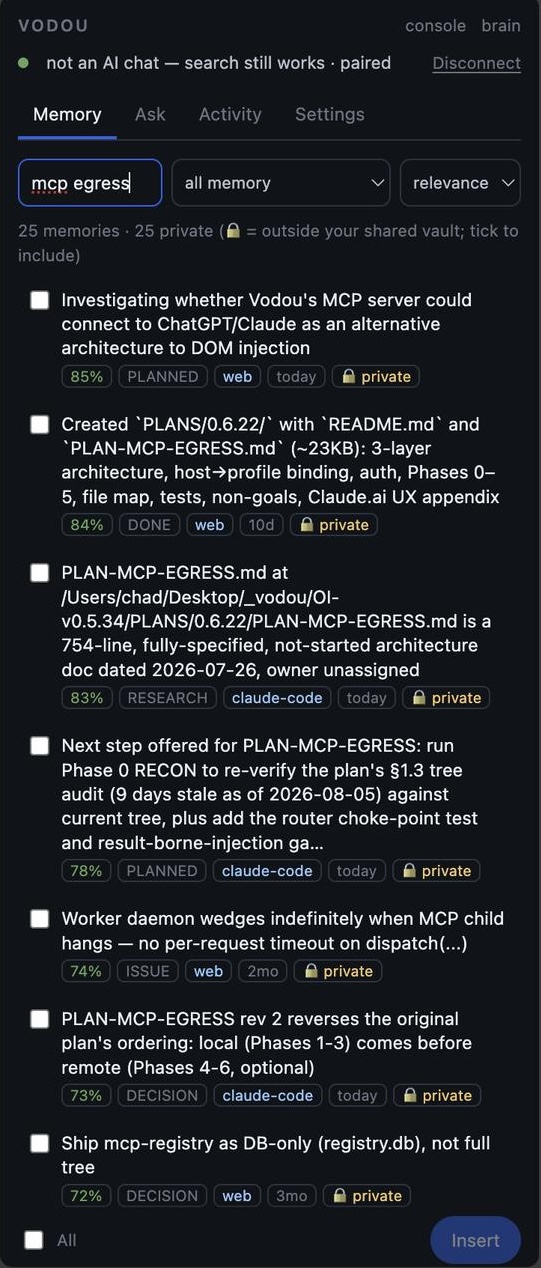
See why a memory was used
Provenance on every retrieval: which conversation, which tool, which date. vodou-core mem why from the CLI, or the receipt in the Console.
Correct, reject, pin, undo
Memory is editable, not a black box. Fix it once and every AI you use gets the fix.
Vaults for scoped sharing
Hand one MCP client a slice of memory by scope, tag, project, host or age. A client can't widen its own vault at call time.

Import the memory you already have
Seven importers: ChatGPT and Claude exports, Obsidian vaults, OpenClaw and Hermes, Letta .af files, and Vodou packs.
A visual map of everything Vodou knows
The Brain view renders your memory as a constellation or a timeline, where brightness is retrieval trust.

Vodou helps me pick up where I left off without constantly re-explaining the context. I'm able to stay in motion and move my work forward much faster.
Sources Model Context Protocol specification · SQLite FTS5 documentation · Vodou docs: memory-follows-you.md · Vodou docs: vodou-memory.md · Chrome Web Store listing for Vodou Bridge
How does Vodou compare to MemoryPlugin, Mem0, and ChatGPT or Claude memory?
MemoryPlugin and Vodou both give you one memory across ChatGPT, Claude and 20+ AI tools; MemoryPlugin stores it in the cloud, Vodou stores it on your machine and also runs tools with it. Mem0 is a developer memory API for building agents, not a personal memory you use in the browser. ChatGPT and Claude memory work well — inside ChatGPT and Claude only. Vodou's trade-off: it needs a local install and a free account to license the engine.
| CAPABILITY | VODOU public alpha | MEMORYPLUGIN extension + cloud | MEM0 developer memory API | CHATGPT MEMORY OpenAI | CLAUDE MEMORY Anthropic |
|---|---|---|---|---|---|
| Where memory lives | Your machine (SQLite) | Vendor cloud | Cloud (Platform) or self-host (open-source server) | OpenAI cloud | Anthropic cloud |
| Works in ChatGPT, Claude, Gemini and other chat sites | 22 sites | 21+ tools (browser extension, Chrome + Safari) | OpenMemory Chrome extension (ChatGPT, Claude, Gemini, Perplexity) — still on the Web Store, source repo archived Mar 2026 | ChatGPT only | Claude.ai + Cowork (cloud runs) only |
| Works in Claude Code, Cursor, IDE MCP clients | Yes (hooks + MCP host) | Yes — hosted MCP server for Claude Code, Cursor, Codex, any MCP client; macOS Sync app for chat history | Yes (SDK, Platform MCP, Claude Code plugin) | No | No — Claude Code keeps a separate per-project memory |
| Works in Slack, Telegram, WhatsApp, Discord… | Unlimited (installable) | No | Your code | No | No |
| How memory reaches the chat | Typed into the box, visible before send | Extension: one-click inject button or automatic (Smart Memory), per-chat off switch; MCP clients: tool calls | Your code / MCP tool calls | Automatic, hidden | Automatic, hidden |
| See why a memory was used | Yes, per retrieval | Shows what was recalled (“Recalled from your memory” label), not why | Developer logs; Platform dashboard | Partial — “Memory sources” icon under a reply lists the saved memories / past chats it used | No per-reply indicator; Topics list only |
| Correct / reject / undo a memory | Yes | Edit or delete individual memories, bulk ops, delete a bucket (dashboard) | API; dashboard edit drawer | Delete individual or all; edit by asking ChatGPT; correct from Memory sources | Read, edit or delete each Topic; pause; reset |
| Import from other AIs | ChatGPT, Claude, Obsidian, OpenClaw, Hermes, Letta | Chat history from ChatGPT, Claude, Gemini, TypingMind, Grok, DeepSeek (Core: last 500 chats; Pro: unlimited) | — (OpenMemory CLI ports coding sessions between Claude Code, Codex, OpenCode) | — | Any AI via copy-paste prompt, plus export (experimental, since Mar 2026) |
| Export your memory | Yes — Vodou pack (mem export) | Not verified (Sep 2026) | API | Full data export (all ChatGPT data) | Yes, experimental (since Mar 2026) |
| Memory can run tools / skills / schedules | Yes — unlimited skills and MCP servers | No | Your code | Limited (agents) | Limited (Cowork) |
| Code you can read | Gateway, skills, extension: Apache-2.0 | Closed | Open-source core (Apache-2.0) | Closed | Closed |
| Needs an account | Yes (free; licenses the engine) | Yes | Cloud: yes · self-host: no (local admin only) | Yes | Yes |
| Price | $10/mo BYOK · 60-day free trial | $89/yr Core · $180/yr Pro (annual; $180 / $300 billed monthly) · $300 lifetime · 7-day trial, card required | Free (Hobby) · $19/mo · $249/mo · Enterprise; OSS free | Included in plan (incl. Free) | Included in plan (incl. Free) |
| Windows / Linux | Yes | Browser extension: any OS · Sync app: macOS only (“Windows on the way”) | SDK and self-host server: any OS | Web | Web |
Frequently asked questions about persistent AI memory
What is persistent memory in AI?
Persistent memory in AI is storage that survives beyond a single conversation, so the assistant can recall your preferences, projects and past decisions the next time you open it. It sits outside the model's context window in a database or file store. Vodou keeps that store on your own computer as a SQLite database with full-text and vector search, readable by every AI tool you connect.
How does AI memory work?
AI memory works in three steps: capture what was said, distill it into facts, and retrieve the relevant facts when a new conversation starts. Vodou captures from 22 AI chat sites, your coding tools and your messaging channels, extracts facts into a local database with provenance and trust weights, and retrieves them with hybrid search plus a reranker. The chosen facts are typed into your next chat where you can see and edit them.
Is it possible to transfer memory from ChatGPT to Claude?
Yes. Export your ChatGPT data, import it into Vodou with the ChatGPT importer, and Vodou makes those facts available inside Claude — and Gemini, Cursor and 20 other tools — by injecting them into the chat when you press Ctrl+B. Imported facts keep an import:chatgpt source label so you always know where a memory came from. Claude and Obsidian exports import the same way.
Does Claude have memories like ChatGPT?
Claude has its own memory feature that remembers project context inside Claude, similar in purpose to ChatGPT's saved memories, but each one stays inside its vendor. Neither can read the other. Vodou sits outside both: it captures what you tell each of them and gives both the same persistent memory, stored locally on your machine.
Is there an AI with good memory?
The best memory today is the one you control. Vendor memory in ChatGPT and Claude is convenient but hidden and single-product. Vodou gives any AI persistent memory with hybrid search and a reranker, shows why each fact was retrieved, lets you correct or reject it, and works across 22 AI sites plus Claude Code, Cursor, MCP clients and every messaging channel you connect — so the model you pick changes and your memory doesn't.
Can Claude and ChatGPT work together?
They can't talk to each other directly, but they can share one memory. With Vodou, a decision you make in ChatGPT is captured locally and shows up when you open Claude, and vice versa. Vodou's harness can also route one request to whichever model fits and run tools with the result, so the two models effectively work on the same context.
What is the best AI memory app?
For remembering your own life, voice-journal apps exist; for remembering your work across AI tools, you want a persistent AI memory layer. Vodou is built for the second job: local storage, capture from 22 AI chat sites, injection into Claude Code and Cursor, memory in Slack and Telegram, importers from ChatGPT and Claude, and a memory that runs skills and tools instead of only recalling.
Does persistent AI memory need the cloud?
No. Vodou's runtime and memory run entirely on your machine and bind only to localhost; model calls go straight from your computer to whichever provider you choose, including fully local models through Ollama, LM Studio or the bundled llama.cpp. Memory is stored and searched on your computer; the only text that leaves is what goes to the model you choose, including the extraction step that turns conversations into facts. Vodou does require a free account so the engine can be licensed to you.
More from Vodou
- AI harnessPlain English in, executed answer out.
- Agent harnessSkills, MCP, workers and hooks — already wired.
- Browser extensionYour chats, captured locally and typed back anywhere.
- AI orchestrationRoute before inference. Run tools together.
- SkillsWorkflows that run the same way every time.
- AutomationAgents that run unattended, within budgets you set.
- MCP gatewayOne MCP host for every editor on your machine.
- Local AI agentRuntime, memory and tools on your machine.
- Claude Code memoryMemory in Claude Code, Cursor and Codex on every prompt.
Stop re-explaining your work.
Install Vodou, connect the AI tools you already use, and start every conversation where the last one ended. Free for 60 days, no credit card.
Updated