
The AI memory extension that shows you every word before you send.
Never re-explain yourself to an AI again.
An AI memory extension saves what you tell one AI so you don't have to repeat it to the next. Vodou Bridge is the Chrome extension for Vodou's memory: it captures your conversations on 22 AI chat sites — ChatGPT, Claude, Gemini, Perplexity, Grok and 17 more — into a memory that lives on your own computer, then brings the relevant facts back with one shortcut. Press Ctrl+B and the memory is typed into the chat box, where you can read it, edit it or delete it before you hit send. With auto-attach off, the default, nothing is sent on your behalf. The extension talks to Vodou on 127.0.0.1 for everything you read, type or save, and asks for no wildcard access to websites.
- Vodou Bridge is a Chrome extension, live in the Chrome Web Store, that captures your chats on 22 AI sites (35 host patterns) into Vodou's memory on your own computer.
- Vodou Bridge injects memory by typing it into the chat box — Ctrl+B on the 22 sites, Ctrl+Shift+B in any text box on any page — so you see and can edit every word before you send; nothing is sent on your behalf unless you turn on the opt-in auto-attach.
- Vodou Bridge talks to the Vodou app on 127.0.0.1 for everything you read, type or save, declares no wildcard host access, and needs the free Vodou app plus a free Vodou account.
- Vodou Bridge is Chrome-only today (no Firefox, Edge or Safari), and its code is Apache-2.0 in the VodouAI/OS repository.
What is an AI memory extension?
An AI memory extension is a browser add-on that saves context, preferences and chat history from AI assistants and brings it back into later conversations — across ChatGPT, Claude, Gemini and other AI sites — so you stop repeating yourself. Vodou Bridge is one: the memory is stored on your computer by the Vodou app and reaches the chat by being typed where you can see it.
Most extensions in this category work the same way: a content script watches the chat page, saves what you and the assistant said to the vendor's cloud, and adds a button or a hidden prompt prefix that pulls memories into the next conversation. Some only archive (Personal AI Memory), some enhance every prompt automatically (AI Context Flow), and the best-known one, Mem0's OpenMemory, was archived in March 2026. MemoryPlugin covers 21+ tools from its own cloud.
Vodou Bridge needs the Vodou app running on your computer and a free Vodou account so the engine can be licensed to you. With that in place, nothing you read, type or save through the extension goes to Vodou's servers: the extension talks to Vodou on 127.0.0.1, and the one outbound request it makes is for a small public settings file from policy.vodou.ai — no cookies, no identifiers — that can only ever turn a site's capture off. Your memory is a SQLite file on your disk, and the extension is one of several ways to fill it and read it.
Why does an AI memory extension matter?
Because every new chat starts from zero. You spend an hour getting ChatGPT to understand your project, then switch to Claude for a task it is better at, or open a fresh tab tomorrow, and it all resets. ChatGPT's memory stays in ChatGPT and Claude's stays in Claude. Vodou Bridge carries what you already explained into whichever of the 22 AI sites you open next, from a memory on your own machine.
Vendor memory is a silo
ChatGPT, Claude and Gemini each keep their own memory, none can read the others', and the memory is capped and curated by the vendor, not you.
Hidden injection is a trust problem
When an extension “enhances every prompt” or lets “the AI instruct the extension to add new memories”, you cannot see what was appended to your message. Vodou Bridge types the memory into the box in front of you.
Cloud memory is someone else's database
Most memory extensions store your facts on their servers. Vodou stores them in a file on your computer, readable by every AI tool you connect.
How does Vodou Bridge work?
Vodou Bridge captures your AI chats into Vodou's local memory, and when you press Ctrl+B it searches that memory for what your draft needs and types the result into the chat box for you to review and send.
- STEP 1
Install from the Chrome Web Store and run Vodou.
Add Vodou Bridge from the Chrome Web Store, pin the icon, and open the side panel (Ctrl+Shift+M — the Control key on a Mac). If Vodou isn't installed yet the panel shows a “Get the Vodou app” prompt; once the app is running with your free account, the panel reads Connected.
- STEP 2
Capture your chats.
Turn on Save my chats (off by default) and every conversation on the 22 supported sites is saved to your local memory as it happens, labelled capture:web:<site> so you always know where a fact came from. On ChatGPT and Claude a small Vodou disc offers Save what's here for one conversation; on any page, highlight text and right-click Send selection to Vodou memory.
- STEP 3
Bring memory back with Ctrl+B.
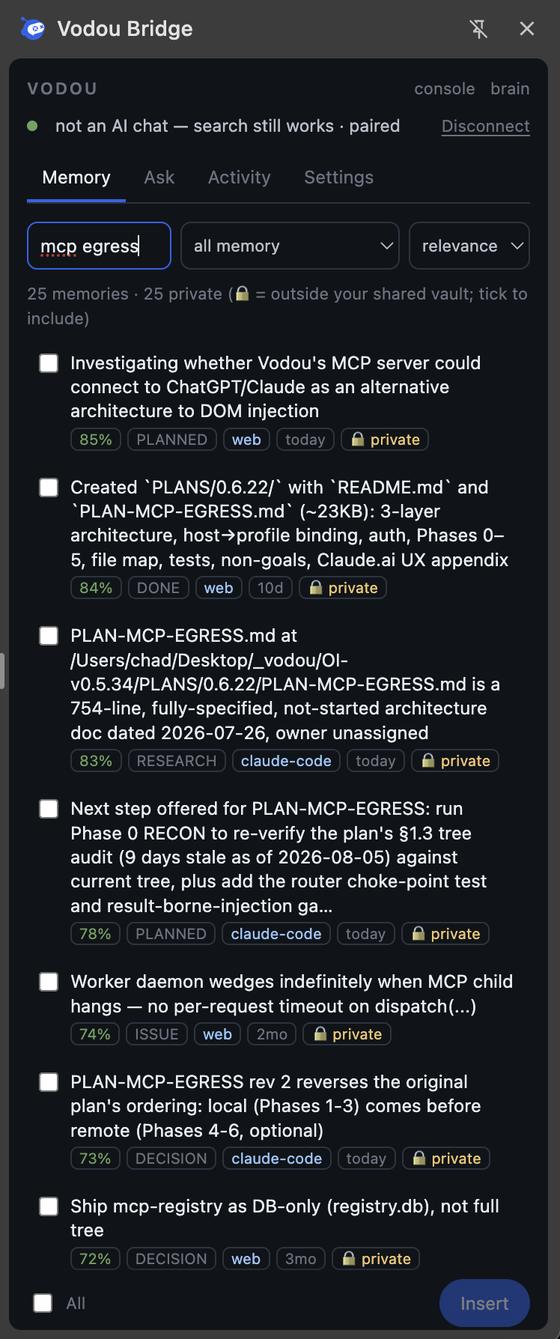
Draft your message, press Ctrl+B: your draft seeds a search over your memory, Vodou picks the facts that actually answer it (with a precision floor that injects nothing rather than noise), and the extension types them into the chat box. Edit or delete anything, then send. Ctrl+Shift+B does the same in any text box on any page; the panel's picker lets you search, tick and insert by hand.
- STEP 4
See what happened, fix what's wrong.
Every capture and insert is listed in the panel's Activity tab. In the Vodou Console you can see why a fact was chosen, correct it, pin it or undo it, and the fix reaches every AI you use. Injected text is registered so capture never re-learns Vodou's own output.
How does the extension fit into Vodou's memory system?
Vodou Bridge is one of four ways conversations get into Vodou's memory and one of many ways memory gets back out. The extension writes what you say on 22 AI sites; Claude Code and Cursor hooks, the MCP host and every messaging channel you connect write in too. An extraction pass distills everything into facts in a local memory.db, hybrid retrieval picks the right ones, and the same facts are typed back into the browser, your IDE, MCP clients and chat channels.
| PART | WHAT IT DOES | WHERE IT RUNS | DEEP-DIVE |
|---|---|---|---|
| Vodou Bridge (this page) | Captures chats on 22 AI sites (35 hosts); Ctrl+B types memory into the chat box; Ctrl+Shift+B into any text box; form fill; tasks from the composer | Chrome, on your machine | Chrome Web Store |
| Claude Code / Cursor / Codex hooks | Four hooks: memory on session start and on every prompt (in Cursor, via a context file the agent reads each turn), a write guard, extraction on session end; a binary under 500 KB over a Unix socket | Your terminal / IDE | Claude Code memory |
| MCP host | Claude Desktop, VS Code, Windsurf, Zed and any MCP client attach with their own token and a vault that fixes what they can read | Your machine, 127.0.0.1 | MCP gateway |
| Channels | Slack, Telegram, Discord, WhatsApp, iMessage, Signal, Microsoft Teams, Google Chat, voice and web talk to the same assistant with the same memory | Vodou Console | — |
| Extraction + the store (memory.db) | Raw turns become facts with a source, a date and a trust weight (first-party 1.0, auto-captured 0.925, imported 0.85) in SQLite with FTS5, vectors and a reranker | Your disk, chmod 600 | AI memory |
| Console + Brain map | See what Vodou knows and why a memory was used; correct, reject, pin, undo | localhost:8765 | AI memory |
| The harness | What memory knows routes into unlimited skills, MCP servers and schedules — the extension's Ctrl+Shift+Y runs a task with all of it | Vodou engine | AI harness · Automation |
Where else does Vodou's memory work?
Vodou's memory works everywhere you talk to an AI: in the browser on 22 AI chat sites through the Vodou Bridge Chrome extension, in Claude Code, Cursor and Codex through hooks, in Claude Desktop, VS Code, Windsurf, Zed and any MCP client through the MCP host, in Slack, Telegram, WhatsApp and every other messaging channel you connect, in the Vodou Console web chat, from the command line, and through an OpenAI-compatible API on your machine.
| SURFACE | HOW MEMORY GETS THERE | READS | WRITES | NOTES |
|---|---|---|---|---|
Browser — 22 AI chat sites ChatGPT, Claude, Gemini, AI Studio, Grok, Perplexity, DeepSeek, Copilot, Le Chat, Qwen, Kimi, Z.ai, T3 Chat, OpenRouter, Poe, Meta AI, Manus, You.com, Duck.ai, NotebookLM, HuggingChat, Character.AI | Vodou Bridge extension: Ctrl+B injects into the chat box; capture is automatic per site | ✓ | ✓ | Chrome Web Store · 35 host patterns · the panel prompts you to install Vodou if it isn't running |
Browser — any text box on any page | Ctrl+Shift+B visible insert; “Fill this form from Vodou” (never submits) | ✓ | opt-in per site | Same extension |
Claude Code | Four hooks: SessionStart, UserPromptSubmit, PostToolUse guard, SessionEnd extraction; plus a generated MEMORY.md in the workspace | ✓ | ✓ | → Claude Code memory |
Cursor | Same hook binary via .cursor/hooks.json, written by the installer | ✓ | ✓ | → Claude Code memory |
Codex in Cursor / VS Code, Agent Mode | Hooks + MCP | ✓ | ✓ | — |
Claude Desktop, VS Code, Windsurf, Zed, any MCP client | Vodou MCP host: vodou-core mcp install <client>; stdio or loopback HTTP 127.0.0.1:8787; per-client token + vault | ✓ (vault-scoped) | ✓ | → MCP gateway |
Any agent that speaks MCP | Vodou-Recall tools: search_memory, memory_store, memory_correct, memory_reject, memory_pin, memory_get, get_current_work | ✓ | ✓ | Plus feed tools that trigger automations |
Messaging — Slack, Telegram, Discord, WhatsApp, iMessage, Signal, Microsoft Teams, Google Chat, voice, web and more | Built-in channels plus any channel you install; same assistant, same memory; approvals reach every channel | ✓ | ✓ | WhatsApp: only threads you start, only your own messages |
Vodou Console localhost:8765 | Web chat with memory injected every turn; Memory tab; Brain map; correct / reject / pin / undo; Projects; Board | ✓ | ✓ | The inspect-and-fix surface |
Terminal — ./do, vodou-core mem | mem search, mem why, mem pin, mem correct, mem import, mem vault | ✓ | ✓ | A full, documented CLI |
Vodou CLI (TUI) | vodou from any directory: the same chat loop in your terminal, memory included | ✓ | ✓ | vodou -p “…” one-shot |
OpenAI-compatible API /v1/chat/completions on 127.0.0.1:8765 | Point any OpenAI-format client or app at Vodou and it answers with memory, skills and tools | ✓ | ✓ | Streaming supported |
Core HTTP API 127.0.0.1:8766 | /api/v2/memory/recall and the rest of a typed local API; TypeScript SDK | ✓ | ✓ | Bearer token, local only |
Kanban board workers | Each spawned agent gets the top memory matches in its prompt | ✓ | ✓ | → Automation |
Scheduler, automations, Skill Consoles | Scheduled and event-triggered runs execute with the same memory | ✓ | ✓ | → Automation |
Imports (one-way in) | ChatGPT, Claude, Obsidian, OpenClaw, Hermes, Letta, Vodou pack | — | ✓ | Facts keep an import:<source> label |
Local models and any hosted provider Ollama, LM Studio, bundled llama.cpp | Whichever model answers, it reads the same memory | ✓ | — | The model changes. Your memory doesn't. |
What can you do with Vodou Bridge?
A ChatGPT memory extension you can watch work
On chatgpt.com the Vodou disc sits bottom-right: hover for Save what's here and Add my memory. Ctrl+B types the facts your draft needs into the composer; you send.
A Claude memory extension, and Claude Code too
The same capture and Ctrl+B on claude.ai. In Claude Code the same memory arrives through hooks on session start and every prompt.
Share memory between ChatGPT and Claude
A decision you make in ChatGPT is captured locally and is there when you press Ctrl+B in Claude, Gemini or any of the other 19 sites. The model changes. Your memory doesn't.
Save ChatGPT chats locally
With Save my chats on, every conversation is stored as it happens in a SQLite file on your disk; an opt-in backfill files older threads when you open them. Uninstalling the extension leaves your memory where it is.
Memory in any text box, and forms filled from memory
Ctrl+Shift+B inserts relevant facts into any text field on any page. Right-click a form for Fill this form from Vodou: a review card proposes a value per field with the memory it came from; only ticked fields are written, and nothing is ever submitted.
Run a task from the chat box
Type a request in any AI chat's composer and press Ctrl+Shift+Y: Vodou runs it with skills, tools and memory and puts the answer back in your draft for you to review. The panel's Ask tab does the same from any page.
Vodou helps me pick up where I left off without constantly re-explaining the context. I'm able to stay in motion and move my work forward much faster.
Sources Chrome extensions: activeTab · Chrome extensions: declare permissions · Chrome Web Store listing for Vodou Bridge · Vodou Bridge source: sites.js ("outgoing requests are never modified") · Vodou docs: memory-follows-you.md
How does Vodou Bridge compare to MemoryPlugin, Rethread and Memdex?
MemoryPlugin covers 21+ tools from its own cloud with a one-click inject button. Rethread and Memdex keep memory in the browser's own storage and need no account — the local-first picks ChatGPT and Perplexity recommend today. AI Context Flow pulls context in with Ctrl+I from its cloud. Vodou Bridge stores memory in a local app, types it visibly, reaches Claude Code, Cursor and Slack as well, and runs tasks — at the cost of installing Vodou and using Chrome only.
| CAPABILITY | VODOU BRIDGE Chrome extension + local app | MEMORYPLUGIN extension + cloud | RETHREAD browser storage | MEMDEX on-device | AI CONTEXT FLOW Plurality Network | PERSONAL AI MEMORY open source |
|---|---|---|---|---|---|---|
| Where memory lives | Your machine, SQLite via the Vodou app | Vendor cloud | Browser IndexedDB; optional end-to-end encrypted cloud sync (Pro) | On your device, encrypted (IndexedDB) | Vendor cloud, end-to-end encrypted, “Trusted Execution Environments” | Browser IndexedDB |
| AI sites covered | 22 (35 hosts) incl. Character.AI, NotebookLM, Perplexity | 21+ tools (ChatGPT, Claude, Gemini, Grok, Perplexity, DeepSeek, Mistral…) | ChatGPT, Claude, Gemini, Grok, Perplexity, DeepSeek | ChatGPT, Claude, Gemini natively; other tools via a pasted “portable summary” | ChatGPT, Claude, Gemini, Grok, Perplexity | ChatGPT, Claude, Gemini, Perplexity, Grok |
| How memory reaches the chat | Typed into the box, visible, Ctrl+B; auto-attach opt-in, off by default | One-click inject button or automatic (Smart Memory); per-chat off switch | You search, edit and pick memories to inject (Alt+Shift+R “Selective Recall”) | Highlights matches as you type; one click attaches past context | Ctrl+I pulls in memory and optimizes the prompt | One-click Recall button (per its README) |
| Browsers | Chrome only | Chrome and Safari (incl. iOS) | Chrome, Edge, Brave, Arc, Vivaldi (any Chromium) | Any Chromium (Chrome, Arc, Brave, Edge) | Chrome | Chrome and Edge |
| Needs a desktop app | Yes — Vodou must be running | No | No | No | No | No |
| Needs an account | Yes, free (licenses the engine) | Yes; card required for the trial | No (free tier); Pro uses email + license key | No sign-up to start | Yes (sign-in) | No |
| IDE / MCP path | Claude Code + Cursor hooks; MCP host for Claude Desktop, VS Code, Windsurf, Zed | Hosted MCP server for Claude Code, Cursor, Codex, any MCP client | No | No | MCP server (OAuth) for Cursor, Copilot, any MCP client | No |
| Messaging channels | Unlimited (Slack, Telegram, Discord, WhatsApp… install any channel) | No | No | No | No | No |
| Memory can run tasks / tools | Yes — Ctrl+Shift+Y, unlimited skills and MCP servers | No | No | No | No | No |
| See, edit, correct, undo | Yes, with provenance per retrieval | Dashboard edit / delete, buckets, version history | Edit, bulk delete, tags, buckets | Browse and pick saved conversations | Memory Studio editor, per-project spaces | Search saved conversations |
| Export | Yes — Vodou pack (mem export) | “Yours to export and delete, anytime” (format not stated) | Markdown, JSON, PDF (Pro) | Portable summary to paste · file export: Not verified (Sep 2026) | Download any item from the editor | JSON backup / restore (incl. embeddings) |
| Import past chats | Yes — 7 importers incl. ChatGPT and Claude | ChatGPT, Claude, Gemini, TypingMind, Grok, DeepSeek | “Bulk-import past chat history” (sources not listed) | Existing ChatGPT or Claude conversations | File upload (.txt, .json, .md, .pdf, .docx); no chat-export importer stated | Its own JSON backups only |
| Code you can read | Extension + gateway Apache-2.0 (VodouAI/OS) | Closed | Not stated | Not stated | Not stated | Apache-2.0 on GitHub |
| Price | Extension free; Vodou $10/mo BYOK after a 60-day free trial | $89/yr Core · $180/yr Pro · $300 lifetime · 7-day trial | Free (100 memories); Pro $6.99/mo or $49 lifetime | Free (10 recent chats); Pro $7/mo, $84/yr or $99 lifetime | Free (200 credits/day); Plus $99/yr; Pro $199/yr | Free |
What should you check before installing an AI memory extension?
An AI memory extension can read your AI chats and write into your prompts, so check five things first: which sites it can access, where memory is stored, whether any text goes to a third-party model, whether you can see and undo every memory before it is used, and how it resists prompt injection from pages it captures. Here is how Vodou Bridge answers each one, so you can hold any other extension to the same list.
| CHECK | VODOU BRIDGE |
|---|---|
| Site access | 35 named AI-chat host patterns, no “all sites” wildcard; anything else only through a click you make (Chrome activeTab). Capture can be turned off per site. |
| Where memory is stored | A SQLite file on your disk, managed by the Vodou app; search, embeddings and reranking run on-device. |
| Text sent to a model | What you inject goes to the AI you are chatting with — no extension can avoid that. Separately, Vodou's extraction step reads captured conversations with the model you selected; choose a local model (Ollama, LM Studio, bundled llama.cpp) and it never leaves your computer. |
| See and undo before use | Memory is typed into the chat box where you read and edit it before sending; auto-attach is off by default. Any memory can be corrected, rejected or undone in the Vodou Console, with the source of each one shown. |
| Prompt injection | Injected blocks are fenced and stripped when the next turn is captured, so memory can't echo back into itself; imported text is sanitized and carries a lower trust weight than what you said yourself. |
| Export and delete | vodou-core mem export writes a portable pack; uninstalling the extension leaves your memory in the app, not in the browser. |
Frequently asked questions about AI memory extensions
Is there a Chrome extension that gives ChatGPT, Claude and Gemini a shared memory?
Yes — several, and Vodou Bridge is one. These extensions don't connect the providers' own memories; they capture what you say in each chat into their own store and bring the relevant parts back into whichever AI you open next. Vodou Bridge does that across 22 AI sites with the store on your computer, and the same memory also reaches Claude Code, Cursor, MCP clients and Slack.
What is the best AI memory browser extension that keeps my data local?
If you want nothing but a browser add-on, Rethread and Memdex keep memory in the browser's own storage with no account. If you want local memory that also works outside the browser — in Claude Code, Cursor, Claude Desktop, messaging apps and scheduled agents — Vodou Bridge stores it in a local Vodou app instead, types it visibly into the chat, and needs a free account and Chrome.
If my memory is stored locally, does ChatGPT still see what I inject?
Yes. A local memory extension keeps the memory store on your device, but once injected text is sent to ChatGPT, Claude or Gemini, that provider receives it under its own terms. Vodou Bridge shows you every word before you send it. For fully local end-to-end use, pair Vodou's memory with a local model through Ollama, LM Studio or the bundled llama.cpp in the Vodou Console.
What is an AI memory extension?
An AI memory extension is a browser add-on that saves context, preferences and chat history from AI assistants and brings it back into later conversations so you don't repeat yourself. Vodou Bridge is a Chrome extension of that kind, with two differences: the memory is stored on your own computer by the Vodou app, and it reaches ChatGPT, Claude or any of 22 AI sites by being typed into the chat box where you can see it.
Is there a ChatGPT memory Chrome extension?
Yes. Vodou Bridge adds a memory to ChatGPT that ChatGPT's own memory cannot give you: one that also works in Claude, Gemini and 19 other AI sites, lives in a file on your computer, and is typed into the composer when you press Ctrl+B. ChatGPT's built-in memory stays inside ChatGPT; Vodou's goes wherever you do, and you can see and correct everything it stores.
Is there a Claude memory extension?
Yes. Vodou Bridge captures your conversations on claude.ai and types relevant memory into Claude's composer with Ctrl+B, visible before you send. Because the memory lives in Vodou rather than in Claude, the same facts are available in ChatGPT, Gemini and Perplexity — and in Claude Code, where Vodou's hooks inject memory on session start and every prompt without the extension.
Can I share memory between ChatGPT and Claude?
Yes. With Vodou Bridge installed, what you tell ChatGPT is captured into Vodou's local memory, and when you open Claude and press Ctrl+B the relevant facts are typed into the box — and the other way round. Neither vendor's memory can read the other's; Vodou sits outside both. Injected text is marked so Vodou never re-learns its own output as something you said.
How do I save ChatGPT chats locally?
Install Vodou Bridge, run the Vodou app, and turn on Save my chats in the side panel: every ChatGPT conversation is then stored as it happens in a SQLite database on your computer, not in a cloud account. Use Save what's here to file one conversation, or turn on the opt-in backfill to file older threads when you open them. Your chats are then searchable from the panel, the Vodou Console and the command line.
What happened to the OpenMemory Chrome extension?
Mem0 archived the OpenMemory Chrome extension on March 23, 2026; the GitHub repository is read-only and points people to the Mem0 platform instead. If you used it for memory across ChatGPT, Claude, Perplexity and Grok, Vodou Bridge covers those four sites and 18 more, stores memory locally instead of through a Mem0 API key, and types memory in visibly rather than attaching it when you press Enter.
Is there an AI memory extension for Character.AI?
Yes. Character.AI is one of the 22 sites Vodou Bridge captures and injects into, alongside ChatGPT, Claude, Gemini, Grok, Perplexity, DeepSeek, Copilot, Le Chat, Qwen, Kimi, Poe, Meta AI, NotebookLM, HuggingChat and others. Capture on some of the less common sites is written from their known wire formats and may need a one-adapter fix when a site changes; the panel and vodou-core capture grade each site as capturing, unknown or broken.
Does Vodou Bridge send my chats to Vodou's servers?
No. Everything you read, type or save through Vodou Bridge goes to the Vodou app on 127.0.0.1 on your own computer. The only request that leaves your machine through the extension is a download of a small public settings file from policy.vodou.ai, with no cookies or identifiers, which can only turn a site's capture off. Memory you insert into an AI chat goes to that AI's provider — because you sent it.
Does Vodou Bridge work on Firefox, Edge or Safari?
No. Vodou Bridge is a Chrome Manifest V3 extension and ships only through the Chrome Web Store today; Firefox, Edge and Safari are not supported. Vodou's memory still reaches those browsers' AI tools indirectly — through the MCP host for desktop apps, hooks for Claude Code and Cursor, and messaging channels such as Slack and Telegram — but the in-page capture and Ctrl+B inject are Chrome-only.
More from Vodou
- AI memoryMemory you own that compounds with every session.
- AI harnessPlain English in, executed answer out.
- Agent harnessSkills, MCP, workers and hooks — already wired.
- AI orchestrationRoute before inference. Run tools together.
- SkillsWorkflows that run the same way every time.
- AutomationAgents that run unattended, within budgets you set.
- MCP gatewayOne MCP host for every editor on your machine.
- Local AI agentRuntime, memory and tools on your machine.
- Claude Code memoryMemory in Claude Code, Cursor and Codex on every prompt.
Stop re-explaining your work.
Add Vodou Bridge to Chrome, install Vodou, and the next chat starts where the last one ended — on every AI site you use. Free for 60 days, no credit card.
Updated